
4G to 5G Converter App: Does It Actually Work in 2026?
If you’ve ever searched for a way to get 5G speeds on your older phone, you’ve probably stumbled across apps claiming to do exactly that — convert your 4G device to 5G with a single tap. It sounds almost too good to be true. Spoiler: it is.
These apps have been circulating app stores and third-party websites for years, and they continue to fool thousands of users every month. Some promise faster speeds. Others claim to “unlock hidden 5G capabilities” buried deep inside your phone’s hardware. None of them actually deliver.
This guide breaks down exactly what these apps are, why they don’t work, and what you can do to get better mobile speeds in 2026 — whether that means optimizing your current phone or finally making the jump to a 5G device.
What Is a 4G to 5G Converter App?
A 4G to 5G converter app is a mobile application — typically found on third-party download sites, and occasionally slipping through app store reviews — that claims to upgrade your phone’s network from 4G LTE to 5G.
The pitch usually goes something like this: your phone has untapped potential, and this app will “unlock” it. Some versions claim to tweak network settings. Others display a fake 5G indicator in your status bar to make it look like you’ve connected to a 5G network. In reality, none of these apps change how your phone connects to a cellular network. Not even close.
Can a 4G Phone Really Be Converted to 5G?
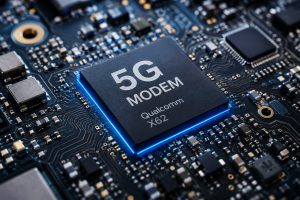
No. A 4G phone cannot be converted to 5G through software, apps, or settings changes. Full stop.
5G connectivity requires specific hardware — a 5G modem and compatible radio frequency (RF) components — built directly into the phone’s chipset. If those components aren’t physically present in your device, no software update or third-party app can add them. It’s the same reason you can’t turn a standard TV into a 4K display by changing a setting.
The hardware simply isn’t there.
How 5G Technology Actually Works
To understand why conversion apps are impossible, it helps to know what 5G actually is.
5G (fifth-generation wireless) operates across three spectrum bands:
- Low-band 5G (below 1 GHz): Wide coverage, speeds slightly faster than 4G LTE.
- Mid-band 5G (1–6 GHz): The sweet spot — good coverage and significantly faster speeds.
- mmWave 5G (above 24 GHz): Blazing fast, but limited range and requires dense tower deployment.
Each of these bands requires dedicated antenna hardware and a modem capable of processing those frequencies. Qualcomm’s Snapdragon X series, Apple’s in-house modems, and MediaTek’s Dimensity chips are examples of 5G modems found in modern smartphones. Without one of these (or equivalent) chips, your phone has no mechanism for receiving or transmitting 5G signals — period.
Why 4G to 5G Converter Apps Exist
If these apps don’t work, why do they keep appearing? The answer is straightforward: they’re profitable.
These apps generate revenue through aggressive advertising, in-app purchases, and in some cases, data harvesting. They target users who are frustrated with slow mobile speeds and willing to try anything. The apps look legitimate. Some even show animated speed tests and fake signal meters to reinforce the illusion.
It’s a classic bait-and-switch — and millions of users fall for it every year.
How to Check If Your Phone Supports 5G
Before downloading anything, check your phone’s actual specs. Here’s how:
On Android:
Go to Settings → About Phone → Specifications (varies by manufacturer). Look for “5G” listed under network support or check your model number against the manufacturer’s official specification page.
On iPhone:
Go to Settings → General → About. Note your model number and compare it with Apple’s official list of supported 5G devices.
Quick Tip: Search your phone model followed by “5G support” on Google. The manufacturer’s official website will usually confirm compatibility within seconds.
How to Enable 5G on Android
If your Android phone supports 5G, follow these steps:
- Open Settings.
- Select Connections or Network & Internet.
- Tap Mobile Networks.
- Choose Preferred Network Type or Network Mode.
- Select 5G/LTE/3G/2G (Auto Connect).
Remember, this option only works if your phone hardware, SIM card, carrier, and local network all support 5G.
How to Enable 5G on iPhone
For iPhone 12 and newer models with a supported carrier:
- Open Settings.
- Tap Cellular.
- Select Cellular Data Options.
- Tap Voice & Data.
- Choose 5G Auto or 5G On.
5G Auto automatically switches between LTE and 5G to balance speed and battery life.
Can a Software Update Add 5G?
No. Software updates cannot add 5G hardware to a phone.
Updates can improve network stability, fix connectivity bugs, optimize battery life, and enhance existing 5G performance on supported devices, but they cannot convert a 4G-only phone into a 5G phone.
4G vs 5G: Key Differences
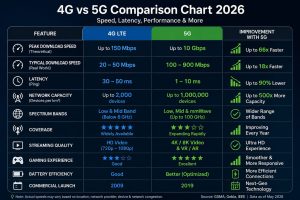
| Feature | 4G LTE | 5G |
|---|---|---|
| Peak Speed | Up to 150 Mbps | Up to 10 Gbps |
| Typical Speed | 20–50 Mbps | 100–900 Mbps |
| Latency | 30–50 ms | 1–10 ms |
| Coverage | Widely Available | Expanding |
| Streaming | HD Video | 4K/8K Video |
| Gaming | Good | Excellent |
Are 4G to 5G Converter Apps Safe?
Most 4G to 5G converter apps are not dangerous simply because they fail to perform the task they promise. However, many of them request unnecessary permissions, display excessive advertisements, collect user data, or encourage users to install additional applications.
Before installing any network-related app, always check:
- The developer’s reputation.
- User reviews and ratings.
- Requested permissions.
- Whether the app is available on the official Google Play Store or Apple App Store.
If an app promises to magically convert a 4G phone into a 5G device, it’s best to avoid it.
Common Myths About 4G to 5G Converter Apps
- Myth: A simple app can unlock hidden 5G hardware.
Fact: Phones require a built-in 5G modem and compatible antennas. - Myth: Changing network settings enables real 5G.
Fact: Settings only allow available network modes supported by your device. - Myth: Software updates can add 5G support.
Fact: Updates improve existing features but cannot add missing hardware. - Myth: Displaying a 5G icon means your phone is using 5G.
Fact: Some fake apps simply change icons without changing the actual network connection.
Best Ways to Improve 4G Speed Without Fake Apps
If your phone only supports 4G, there are still several legitimate ways to improve your mobile internet experience.
- Restart your phone regularly.
- Keep your operating system updated.
- Use a carrier with stronger coverage in your area.
- Reset network settings if connectivity issues occur.
- Remove unnecessary background apps using mobile data.
- Move to an area with stronger signal reception.
- Replace an old or damaged SIM card if recommended by your carrier.
- Use Wi-Fi whenever available for heavy downloads.
When Should You Upgrade to a 5G Phone?
If your current phone only supports 4G and you frequently stream videos, play online games, download large files, or work remotely using mobile data, upgrading to a genuine 5G smartphone may be worthwhile.
Before upgrading, make sure:
- Your carrier offers 5G service.
- 5G coverage is available in your area.
- Your plan supports 5G connectivity.
- Your new phone supports the 5G bands used by your carrier.
Frequently Asked Questions (FAQs)
Can an app really convert a 4G phone into a 5G phone?
No. No application can add the hardware required for 5G connectivity. If your phone was not manufactured with a 5G modem and compatible antennas, no app or software update can convert it into a real 5G device.
Do 4G to 5G converter apps increase internet speed?
Not in the way they advertise. Some apps may optimize background processes or reset network settings, but they cannot provide true 5G speeds or capabilities.
Can a software update enable 5G?
Only on phones that already include 5G hardware. A software update cannot add missing hardware components.
How can I check whether my phone supports 5G?
Visit your phone manufacturer’s official website or search your exact phone model followed by “5G support.” You can also check your device specifications in the Settings app.
What’s the best way to get real 5G?
Use a genuine 5G-compatible smartphone, a 5G-enabled SIM (if required by your carrier), a supported mobile plan, and stay within your carrier’s 5G coverage area.
Final Verdict
Despite thousands of downloads and bold marketing claims, 4G to 5G converter apps simply cannot perform the upgrade they promise. Real 5G requires dedicated hardware, carrier support, and compatible network infrastructure. Software alone cannot replace those physical components.
If your goal is faster mobile internet, focus on legitimate solutions such as updating your device, improving your network settings, choosing a stronger carrier, or upgrading to a phone that was designed for 5G from the start.
Understanding how mobile networks actually work helps you avoid misleading apps and make smarter decisions when upgrading your device in 2026 and beyond.